


Shipping & Orders
We are working closely with our external partners and carriers to ensure your Order can reach you as quickly as possible. See below for the most up-to-date information (excluding potential courier delays)*:
Estimated Shipping Time
Australia & New Zealand
Standard: 7–14 business days
Express: 1–5 business days
United States
Standard: 3–6 business days
Express: 2–5 business days
Canada & Mexico
Standard: 5–10 business days
Express: 2–3 business days
United Kingdom
Standard: 3–4 business days
Express: 1–2 business days
Europe
Economy: 6–18 business days
Express: 2–5 business days
Asia (selected countries)
Economy: 6–18 business days
Express: 2–3 business days
Middle East (selected countries)
Standard: 6–12 business days
Express: 3–6 business days
Rest of World
Economy: 6–18 business days
Express: 2–5 business days
*During the Black Friday and holiday seasons, please be aware that packages may experience delays due to high order volume.
Qure currently ships worldwide! Packages are shipped via FedEx, USPS or DHL courier with standard shipping services.
In Spain we don't ship to Balears Province (also known as the Balearic Islands), Las Palmas, and Santa Cruz de Tenerife.
Free shipping applies to orders over $149 for US and £149 for UK. See "How much does shipping cost?" below.
Final shipping charges and available express shipping options are shown at checkout.
Here's how it works: you order, we process, then we ship. Ordering takes a few seconds.
Processing takes 1 to 3 business days (and orders placed after 9am ET are processed the next business day). Then one of our carriers takes it from there. Pre-order and backordered items ship on the date shown on the product page.
You'll get a shipment notification email with a tracking number as soon as your package ships and it's on the way!
Check your spam folder if you do not see it, and add our sender address to your contacts.
If your order includes an item that is on pre-order or back in stock later, or an item that ships from a different warehouse, we send the available items first rather than hold your whole order. Each package has its own tracking number and you are not charged extra for a split shipment. Tracking emails are sent for each package. If you would rather wait and receive everything together, contact us before your order ships and we will see what we can do.
The expected ship date is shown on the product page when you order. Your card is charged at purchase. We email you a tracking number when your item ships. If the date changes, we will email you.
Orders shipped outside the US may be charged local taxes, VAT or import duties when they reach your country. These are set by your local customs office, not by Qure. The carrier will ask you to pay them before delivery. For UK orders, VAT is collected at checkout. We are legally required to declare the full value of the shipment and will provide an invoice to customs should they require it.
Please do not refuse the parcel. If you refuse delivery or the charges go unpaid, the parcel is returned to us. Unpaid duties and a $10 restocking fee are then deducted from your refund. If you have questions about a charge, contact your local customs office first.
If your tracking says delivered but you cannot find the parcel, check with others in your household and your neighbors, look in safe places and check any doorbell camera. If you still cannot find it, or if the parcel arrived damaged or with items missing or wrong, please contact us within 15 days of the delivery date.
Provide your order number and details of the missing items, and we will assist you in resolving the issue as quickly as possible. Please prepare a photo of all items received, the packing slip, barcode, and the shipping label affixed to the box. Keep all packaging until we have resolved your case.
Use the tracking link in your shipping confirmation email, or enter your order number on our Order Tracking page. Carriers can take 1 to 2 business days to show the first scan. Tracking can also pause for several days while a parcel moves between countries or between carriers.
Contact us if tracking shows no movement for 5 business days, or if it says delivered and you cannot find the parcel. Have your order number ready.
Within 30 minutes of ordering, you can update your delivery address, email address and order notes yourself using the link in your confirmation email.
After 30 minutes, contact us as soon as possible. If your order has not been dispatched, we can usually help with changes. We cannot move an order to an address in a different country.
Orders go to our warehouse automatically and we cannot always stop them. Once an order has shipped it cannot be cancelled or changed. You can return it after it arrives under our 30-day money-back guarantee (see Returns & Exchanges).
If your promo code won't apply or you get an error message, check whether the following applies to you:
- You haven't entered the code exactly as it was advertised - Try copying and pasting it and don't leave any extra characters or spaces.
- The code is expired - Check the end date in the email, text or post where you found it. We cannot apply expired codes after the order is placed.
- The code is being used on an already discounted bundle.
- The code is only valid for a particular product - Double check that you're purchasing the right product for the code you want to use.
- You didn't obtain your coupon from a valid source - These are: our website banner, social media post, or email promotions - be sure to subscribe to our newsletter.
- You signed up for a code but did not receive it: check your spam and promotions folders, then contact us and we will resend it.
If you are still experiencing problems after checking all the points above, please contact us via the Help Center. Include the details of the coupon code you're trying to use and the items you have in your cart - we'll be happy to help!
You can use one promo code per order. If you've encountered two valid Qure promo codes then please choose the one you want to use more.
Orders placed on another store are handled by that store. Warranty and returns on this page apply to products bought directly from qureskincare.com.
Use the Help Center (chat and email), WhatsApp (+1 240 896 3833), or book a free call with our team. Our team are always on hand to help and you can expect a response within 24hrs. During Busier times or holiday season it may take up to 48hrs for a response. Please include your order number so we can help faster.
SecureShip is optional shipping protection you can add at checkout. It covers parcels that are lost, damaged in transit, or reported delivered but stolen. If you have SecureShip and your parcel is lost or damaged, contact us within 15 days of delivery, keep all packaging, and send photos. We will arrange a replacement or refund. If you did not add SecureShip, contact us anyway and we will look into your case with the carrier.
How to make a claim:
All packaging material and damaged goods must be kept in the original form as received. Packaging and damaged goods should not be disposed of or released to the carrier before a claim is completed as photographs will be required. Failure to comply will result in the denial of the claim due to insufficient packaging.
Concealed damage allows for the discovery of loss or damage up to 15 days after final delivery. The loss is deemed to have possibly occurred during the insured transit. Discovery of loss or damage occurring 16 days or later after final delivery is deemed to have occurred while the shipment was NOT in transit, and therefore, is not covered.
In case of loss or damage to the covered parcel or freight the following must be completed:
- The Insured will file immediate notice of non-delivery, damage, or shortage with the Qure Customer Service Team. The Insured will not file a claim with the Carrier as all rights to the carrier provided coverage is assigned to Qure Customer Service Team.
Once a claim has been accepted and approved by us, prompt payment will be made to the Insured. SecureShip will rely on the determination of responsibility made by the original Carrier to assist in substantiating the loss.
All fees paid for the Services are non-refundable and non-transferable except as may be expressly provided in these Terms.
Q-Rejuvalight Pro Facewear
Q-Rejuvalight Pro Facewear is a non-invasive LED face mask that brings clinically studied light wavelengths into an easy at-home treatment. It is FDA-cleared for the treatment of wrinkles and mild to moderate inflammatory acne, helping improve the look of fine lines, firmness, skin tone and texture over time.
It comes with a compatible iOS/Android app that allows you to personalize, schedule and track your treatments.
Q-Rejuvalight Pro Facewear is a face mask that puts clinical-grade LED therapy in your hands so you can operate easily, all by yourself, in the comfort of your own home!
It comes with a compatible iOS/Android app that allows you to fully customize, track and plan your treatments.
Q-Rejuvalight Pro Facewear uses clinically studied wavelengths of LED light delivered directly to the skin. In Skin Rejuvenating Mode, multiple wavelengths help reduce the appearance of fine lines and wrinkles while improving the look of firmness, elasticity, uneven texture and radiance.
Skin Clearing Mode uses targeted wavelengths to help treat mild to moderate inflammatory acne, reduce breakouts and support clearer-looking skin over time.
Q-Rejuvalight Pro Facewear uses clinical-grade technology to deliver concentrated wavelengths of light to your skin. The wavelengths are absorbed by your skin cells. Used consistently, this can help skin look smoother, firmer and more even over time.
The Q-Rejuvalight Pro features 160 dual-core LEDs and uses 5 clinically studied light wavelengths across its Skin Rejuvenating and Skin Clearing treatments:
- Infrared light (880 nm): Used in the Skin Rejuvenating treatment as part of a multi-wavelength approach designed to help improve the appearance of fine lines, firmness, elasticity and skin texture.
- Deep Red (660 nm): Used in the Skin Rejuvenating treatment to support smoother-looking skin and a more radiant-looking complexion.
- Red (630 nm): Used across both Skin Rejuvenating and Skin Clearing treatments to support smoother, clearer-looking skin and improve overall skin appearance over time.
- Amber (605 nm): Used in the Skin Rejuvenating treatment to help improve the look of uneven skin tone and texture and support a more radiant-looking complexion.
- Blue (415 nm): Used in the Skin Clearing treatment to help treat mild to moderate inflammatory acne, reduce breakouts and support clearer-looking skin over time.
There are three treatment modes: the Skin Rejuvenating Treatment; the Skin Clearing Treatment; and custom zone selection on five facial areas via the Qure app.
Yes! The Q-Rejuvalight Pro Facewear uses red, infrared, amber, and deep red lights for the Skin Rejuvenating treatment.
The Skin Rejuvenating Treatment is FDA-cleared for the treatment of wrinkles and combines red, deep red, infrared and amber wavelengths to target visible signs of skin aging, which is also why the LED lights appear orange. With consistent use, it helps reduce the appearance of fine lines and wrinkles, improve the look of firmness and elasticity, smooth uneven-looking texture and promote a more radiant-looking complexion.
The Skin Clearing Treatment combines red and blue wavelengths and is FDA-cleared for the treatment of mild to moderate inflammatory acne. With consistent use, it helps reduce breakouts, improve the appearance of acne-prone skin and redness associated with acne, and support clearer-looking skin over time.
Yes! While each Q-Rejuvalight Pro Facewear comes with a recommended pre-programmed treatment routine, you can personalize your treatments and experience by creating your own treatment routine via the Qure Skincare app.
You can choose your preferred treatment mode (Skin Rejuvenating or Skin Clearing) on 5 different facial areas.
Yes. Q-Rejuvalight Pro is an FDA-cleared, non-invasive LED light therapy device designed for at-home use. It requires no downtime and involves no needles or surgery. It is suitable for Fitzpatrick skin types I–IV when used as directed. If you have Fitzpatrick skin type V or VI, check with your doctor or healthcare professional before use.
Before your first full treatment, you must complete the light sensitivity test outlined in the user guide. After testing, wait 24 hours. If you experience pain, discomfort or redness lasting more than two hours, consult your doctor before continuing. Always use the supplied protective eyewear and follow the user guide.
It is not suitable for everyone: see "Who should not use the Q-Rejuvalight Pro?" below.
Q-Rejuvalight Pro is intended for adults only. Do not use the device if you are photosensitive or taking medication that increases sensitivity to light unless your healthcare professional has confirmed it is suitable for you.
Consult your doctor before use if you are pregnant, breastfeeding or planning to become pregnant, or if you have a history of seizures triggered by light. If you have severe acne or painful, raised, crusting or bleeding skin, consult a healthcare professional before treatment. Do not use the device if you have had a sunburn within the past two weeks.
The Q-Rejuvalight Pro has been tested and cleared for eye safety. It has successfully passed the IEC62471 evaluation for eye safety test, which is used to determine whether a device's light output is safe for the eyes or not. Regardless, we recommend closing your eyes and wearing protective eyewear during treatment. The light can be bright when powered on and some users may experience sensitivity, even when closing their eyes.
As part of our commitment to your safety we decided to take the initiative to include certified light blocking protective eyewear with our Q-Rejuvalight Pro LED mask.
You can manually use your Q-Rejuvalight Pro Facewear without using the app. However if you're wanting to customize your treatment on different areas on your face, then this will need to be done via the Qure Skincare app.
To choose/change a full treatment without using the app, follow the instructions below:
- Power on the device by holding the Q button on forehead until the led indicator light is on
- Press the button once for Skin Rejuvenating mode
- Press it again for Skin Clearing mode
- Switch off the device by holding down the Q button until the indicator light turns off
You may easily fit in a 3-minute treatment right after you wash and dry your face. The only important thing to remember is that your face should be clean before the treatment. Once the treatment is done, you may proceed in applying serums and creams to your skin as desired!
You only need one 3-minute treatment per day. For best results, we recommend that you do your 3 minute treatment daily. You may also do one full Skin Rejuvenating treatment and one full Skin Clearing treatment per day.
Results depend on your skin and your concern. With daily use, many users notice clearer-looking skin within 2 weeks. Smoother-looking skin, softer-looking fine lines and a more even tone usually take 8 to 12 weeks. Individual results vary. We recommend using the mask consistently for at least 3 months before judging results.
Yes. Use the Q-Rejuvalight Pro on clean skin before applying retinol. After your LED treatment, follow with your usual retinol serum, such as Qure’s All-In-One Face Serum, as directed.
If you’re performing a Micro-Infusion treatment, you can use the Q-Rejuvalight Pro before your treatment and again the following morning, provided your skin feels comfortable. The morning-after LED session can be used as part of your post-treatment routine to support a calmer-looking complexion.
Many people use light therapy alongside retinol. If you use Micro-Infusion or another needling treatment, wait until any redness has settled before using the mask, and follow the post-treatment care steps in the Micro-Infusion guide. If your skin feels irritated, pause use and contact us.
Activate your Q-Rejuvalight Pro Facewear via the Qure Skincare app, or follow the How To Use guide, which can be found inside the box.
After cleansing your face, place our Q-Rejuvalight Pro Facewear comfortably over the face, securing strap around head. Press and hold the Q power button on forehead for 3 seconds to turn on our Q-Rejuvalight Pro Facewear, select treatment mode on the app (Skin Rejuvenating or Skin Clearing) and start your treatment!
The Q-Rejuvalight Pro is USB-rechargeable. A two and a half hour charge can deliver up to 10 treatments. Plug into a USB power adapter. Input should be 5V/1A and the voltage should be no more than 5V.
Plug the USB-C power/charging cord into the port connector of your Q-Rejuvalight Pro Facewear, then plug it into a universal USB power adapter. Device is fully charged when the red power indicator light next to the charging port is turned off.
No, you cannot turn on the device while charging for safety reasons.
Charging
- Indicator light is slowly blinking while plugged in: The mask is charging. Leave it plugged in. A 2.5-hour charge gives up to 10 treatments.
- Indicator light turns off while plugged in: The mask is fully charged. Unplug it and it’s ready to use.
- Indicator light is rapidly blinking: The battery is low. Charge the mask.
Turning the mask on
- Indicator light on after you press and hold the Q button on the forehead: The mask is powered on. Press the button once for Skin Rejuvenating mode or twice for Skin Clearing mode, or choose a mode in the app.
- No light when you press the Q button while plugged in: The mask can’t be turned on while charging. Unplug it, then hold the Q button for 3 seconds.
- No light when you press and hold the Q button and it is not plugged in: The battery may be flat, or there may be a charging problem. Charge fully with the USB-C cable and a 5V adapter, and try a different cable or outlet. If it still doesn’t turn on, contact us through the Help Center.
During treatment
- Lights go off before 3 minutes: The battery is low, or the mask is too warm. Let it cool for a few minutes and charge it fully. If it keeps switching off early, contact us.
- Lights go off at 3 minutes: The treatment has finished. Nothing is needed, as the mask shuts off automatically.
Inside the box, you'll find:
- Q-Rejuvalight Pro LED Face Mask
- Adjustable head strap for a secure, comfortable fit
- Protective eyewear
- USB-C charging cable
- Portable luxury storage pouch
- Clear setup instructions and user manual
We recommend to keep your Q-Rejuvalight Pro Facewear in a dry environment and always keeping your Q-Rejuvalight Pro in the storage bag when not using it.
Usually, the bathroom is not the best place for keeping your Qure device due to the heightened moisture in a bathroom.
Wipe the inside with a damp cloth to remove any residue from skin oils after each use. Make sure the Q-Rejuvalight Pro Facewear is unplugged and turned off. Then use a damp, soft, or microfiber cloth to clean the facial area. Repeat until the Q-Rejuvalight Pro Facewear is clean and then dry with a clean dry cloth.
Make sure to clean your face thoroughly before use! Residue from make ups or other creams/serums can cause discoloration.
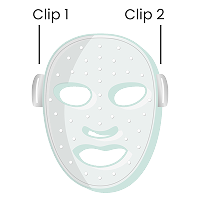
To secure your strap, first position the mask so the LED lights face towards you.
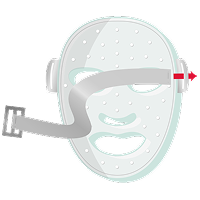
Step 1. Slide the strap through clip 2, making sure the Qure logos on the strap are facing down.
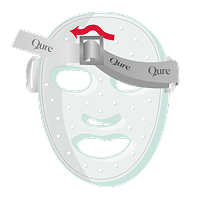
Step 2. Insert the strap through the slide adjuster. You could now see the Qure logos on the strap.
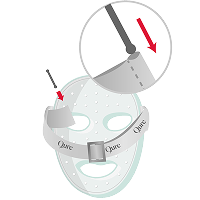
Step 3. Slide the strap through clip 1, push the provided pin through the end of the strap, and secure the pin by pulling on the strap.
Yes. The Q-Rejuvalight Pro Facewear is BPA free.
For those pregnant or breastfeeding, we recommend checking with your doctor before starting Red Light therapy treatments.
Q-Rejuvalight Pro Facewear comes with one (1) year warranty covering any manufacturer related problems resulting from everyday use of the product. For more information on warranty, please visit our Warranty section below.
Yes. The Q-Rejuvalight Pro is an FDA-cleared, at-home LED light therapy device for the treatment of wrinkles and mild to moderate inflammatory acne. It uses clinically studied light wavelengths and is designed for regular at-home use.
Micro-Infusion System
The stamping action of the Micro-Infusion device creates tiny micro-channels on the surface of the skin, helping to enhance the absorption of active ingredients and visibly refresh the complexion.
The serum you choose during your Micro-Infusion treatment will deliver visible results over time. The device uses single-use, gold-plated needles
You can switch up your treatments by alternating the serums every two weeks.
Visible benefits of Micro-Infusion may include:
- More even-looking skin tone and texture
- Glowing, refreshed-looking complexion
- Softer-looking fine lines
- Skin that feels renewed and rejuvenated
Micro-Infusion treatment is an effective skin-boosting step, and many users report a visible radiance boost, glowy-looking complexion, and skin that feels more hydrated within a day or two after their first treatment. Individual results vary.
The more consistently you use the treatment, the more visible improvements you’ll likely notice over time. This easy-at-home facial is perfect to use a day or two before a big event, when you want your complexion to look and feel refreshed.
Don’t forget to keep up with your everyday skincare routine to help maintain the results of your Micro-Infusion treatment and keep your skin looking its best long-term
Timeline of Visible Results
After 1–2 Treatments (Weeks 1–4):
- Typically users experience mild redness post-treatment that settles within a few hours – this is a normal response!
- Skin looks more hydrated, plumped, and refreshed.
- Complexion appears smoother and more radiant.
After 4 Treatments (Around 8 Weeks):
- Fine lines begin to appear softened.
- Skin tone looks more even and bright.
- Hydration feels longer-lasting.
After 6+ Treatments (12 Weeks and Beyond):
- Complexion looks clearer and more balanced.
- Skin looks firmer.
- Texture appears smoother and more refined.
- Overall skin looks more youthful.
We recommend a Micro-Infusion treatment every 2 weeks for the best results!
Each treatment uses one single-use needle head and one full serum ampoule. Dispose of the needle head after every treatment.
No. We recommend using only Qure serums specifically formulated for the Micro-Infusion System.
The serum formulation, consistency and viscosity are selected and tested to work with the Micro-Infusion needle head and serum-delivery system for appropriate flow and treatment performance. Other serums may have a different viscosity, ingredient profile or formulation that has not been tested for use with the device and may affect flow, performance or skin compatibility.
Not all serums are suitable for Micro-Infusion. We have developed our serum ampoules for use with Qure's Micro-Infusion System. They are formulated without fragrance.
Choose the serum that best matches your main skin concern:
Rejuvenating Serum: Designed to hydrate, plump the look of skin and soften the appearance of fine lines and wrinkles.
Brightening Serum: Designed to improve the appearance of uneven tone, dark spots and discoloration for a brighter, more even-looking complexion.
Use one serum per Micro-Infusion treatment. If you want to target both concerns, alternate between the Rejuvenating Serum and Brightening Serum with each treatment, performed every two weeks.
Before treatment:
1. Start with thoroughly cleansed skin and clean hands.
2. Patch test before your first full treatment.
3. Avoid retinol, exfoliating acids (AHAs, BHAs, PHAs), Vitamin C and alcohol-based toners for at least 48 hours beforehand.
4. Do not perform Micro-Infusion over active acne, open wounds, broken or irritated skin.
After treatment: Leave the serum on overnight and keep your routine simple. Avoid makeup, harsh skincare and direct sun exposure immediately after treatment. From days 2–3, use a gentle cleanser and moisturizer, continue daily SPF 50, and avoid retinoids, exfoliating acids, Vitamin C, excessive heat, sweating, steam rooms, saunas and swimming while your skin settles.
Mild redness, slight sensitivity and a warm or tingling feeling can occur immediately after treatment. This is a normal temporary response and should typically settle within a few hours.
Do not perform Micro-Infusion over active acne, open wounds, broken or irritated skin. Do not use Micro-Infusion if you are pregnant or breastfeeding. You should also seek professional advice before use if you have a history of post-inflammatory hyperpigmentation, particularly sensitive skin, or an underlying skin or medical condition.
Stop use and seek medical advice if you experience significant swelling, a rash, blistering, severe or persistent redness, or significant pain. If symptoms are severe or worsening, contact a healthcare professional.
This is usually the serum sitting away from the needles, and it is easy to fix.
Try these steps in order:
- Let the serum reach the needles. After you attach the needle head, hold the device upside down for 1 to 2 minutes so the serum flows into the needle head.
- Tilt the device. While you stamp, keep the serum at the needle end. Lean your head back slightly, or tilt the device up towards the ceiling, to help the serum move through the needles.
- Give it a tap. Put the lid back on, hold the device upside down, and firmly tap the end a few times to push the serum down towards the needles.
- Check your pressure. Use light pressure. Pressing harder does not help the serum flow.
- Loosening the needlehead slightly can also help with serum flow.
Please do not reuse a needle head after a treatment, even if it looks clean. Each needle head is single-use.
If the serum still will not come through, or the vial or device looks damaged, contact us through the Help Center with your order number and a short video or photo showing the problem. We will help you sort it.
We don’t sell needle heads on their own. Each treatment is designed to use one serum vial with one single-use needle head, so they are supplied together as a set. Using a needle head more than once is not recommended, and using it with leftover serum from a different vial is not part of the treatment.
If you’d like more treatments, you can buy a Micro-Infusion supply with the number of months that suits you. Every supply includes a needle head and a serum vial for each treatment.
Q-Renew LLLT Helmet
The Q-Renew LLLT Helmet is an FDA-cleared light therapy device designed to support healthier looking hair by delivering low-level red light and laser energy directly to the scalp.
It uses 220 LED diodes and 150, low-level laser diodes with clinically studied wavelengths, designed to promote hair growth and support fuller-looking hair over time.
The Q-Renew LLLT Helmet delivers targeted red LED wavelengths and low-level laser energy directly to the scalp. This light therapy supports hair follicles, encourages the active growth phase, helps support follicle activity and supports circulation around the follicles. With consistent use, the Q-Renew LLLT Helmet has been clinically evaluated to improve hair fullness, thickness and overall hair quality in 16 weeks.
The Q-Renew LLLT Helmet contains 220 LED diodes that operate at 630 nm, 660 nm, and 680 nm, along with 150 medical-grade, low-level laser diodes that emit light at 655 nm, providing a total of 370 targeted light sources for comprehensive scalp coverage.
On the LCD screen you're able to select your desired treatment zone before starting the session. This means you aren't locked into a single full-head mode. You can choose where you want the light therapy to focus.
Use the Q-Renew LLLT Helmet on clean, dry, product-free hair before applying any styling products, oils, serums, or treatments. We recommend using the helmet 5-7 times per week for at least 16 weeks. After that, continue every other day to maintain results. Each treatment lasts 12 minutes and ends automatically.
Hair growth takes time and consistent use. Visible improvements were observed after 16 weeks in Q-Renew’s study, with results becoming more noticeable with continued treatment.
After 16 weeks, clinical measurements showed increases of up to 27% in hair growth rate, up to 12% in average hair thickness and up to 19% in total hair width per cm². Individual results may vary.
To charge your Q-Renew LLLT Helmet, connect the provided USB-C cable to the charging port on the back of the charging base, or connect the cable directly to the helmet’s charging port. Plug the other end into a power supply using a 5V DC adapter. Only use the provided USB-C cable and a 5V DC adapter for charging.
When the device is charging, the LCD screen will display the charging status. If the screen is inactive, tap it to check the progress. A full charge takes approximately 4 hours.
The best way to store your Q-Renew LLLT Helmet is in a cool, dry place away from direct sunlight. We recommend storing your helmet on the charging base to keep it ready for your next treatment, or in the provided box.
The device can be cleaned with a water-based wipe or a damp, clean cloth. For stubborn stains, we recommend gently wiping with 70% alcohol. Avoid using harsh abrasive cleaners, solvents, or other chemical products as this may harm the device.
Optional: For an enhanced cleaning experience, lightly spray the inside of the helmet with the Qure Dermal Mist and gently wipe to help maintain hygiene and freshness.
Do not use this product if you are under 18, pregnant, breastfeeding, photosensitive, on light-sensitizing medications, prone to light-triggered headaches or seizures, or have open wounds or infections on the scalp.
Not sure if it is right for you? Book a free consultation with our team.
We provide a 3-year limited warranty covering defects in materials and workmanship for the Q-Renew LLLT Helmet when purchased directly from Qure Skincare. For more information on warranty, please visit our Warranty section below.
Yes. The Q-Renew LLLT Helmet is FDA-cleared for the promotion of hair growth in males who have Norwood-Hamilton classifications IIa–V, and in females with androgenetic alopecia who have Ludwig-Savin classifications I–II, and in both, Fitzpatrick skin phototypes I–IV.
If your helmet isn’t charging or switching on, try the following:
1. Check the power connection. Make sure the supplied USB-C cable is securely connected and you’re using a 5V DC adapter. Try a different power outlet if needed.
2. Allow it to fully charge. A full charge takes approximately 4 hours. The LCD screen displays the charging status, and you can tap the screen to check progress if it is inactive.
3. Try charging the helmet directly. If you normally charge through the charging base, connect the supplied USB-C cable directly to the charging port on the helmet. This helps determine whether the issue is with the charging base or the helmet itself. The manual confirms the helmet can be charged either way.
4. Try turning it on again. Press and hold the power button for at least one second. If the helmet switches off unexpectedly, the battery may be low and should be fully charged before use.
5. Still not working? Contact Qure Customer Support with your proof of purchase, device serial number, and a photo or short video showing the issue. Do not attempt to open, modify or repair the helmet yourself, as this may void the warranty.
Returns & Exchanges
Please submit your return via our portal here for products you'd like to return, and we'll take care of the rest. Returns must be approved before you send anything back. You will receive a Return Authorization Number (RMA) that must be included with the parcel, or the return will be rejected. Return all accessories, original packaging, user manuals and inserts.
Yes, please contact us through the Help Center and we’ll help you with your exchange. Include your order number and the item you’d like to exchange.
If you change your mind, you can return your purchase within 30 days of receiving your order for a refund. We do not cover claims about results in the first 30 days. We recommend using the product for at least 3 months, as stated on the product page. Shipping delays are not covered by the guarantee.
You pay return shipping and carry the risk of loss in transit. Shipping, handling, wrapping fees and taxes (including customs and VAT) are not refunded. A restocking fee of $10 plus return shipping fee applies.
Full-price products are refunded to your original payment method. Orders paid with Klarna, Sezzle or Afterpay are eligible for store credit only.
Once we receive and inspect your return, we process your refund within 7 to 10 business days and email you when it is done. Your bank may then take a further 5 to 10 business days to show it.
If you received a product different from the one that you ordered, please contact us via the Help Center with your order number and a photo of what you received and we'll be sure to make this right!
Contact us with your order number, a description of the problem and photos or a video. We will guide you through troubleshooting first. If the issue is not fixed, we will help you make a warranty claim.
Yes. If you bought as part of a promotion, such as a bundle, a buy-one-get-one offer or a free gift with purchase, all items in the promotion must be returned to receive a refund. Bundles are already discounted and cannot be partly returned.
You may find our returns policy here.
Yes. If you or someone you gave a gift to would like to return a product from an order placed between 1 November and 31 December 2026, you have until 31 January 2027, or 30 days from delivery, whichever is later. Returns are made by the person who placed the order, using the order number from the confirmation email. If you are returning a gift, ask the buyer to start the return, or contact us with the order number and we will help.
All other return terms still apply, including getting a Return Authorization Number before you send anything back. See our returns policy for the full terms.
If these FAQs haven’t answered your question about returns, contact us through the Help Center and our team will help.
Billing & Payments
We accept Visa, Mastercard, American Express credit cards or debit cards and PayPal.
Your credit card will be charged as soon as your order is accepted and processed.
Of course! You can make this change on your account page. If you need help, contact us via Customer Portal.
Please look out for “QURE SKIN” or “INSPIREBRANDS” charge on your credit card statement or PayPal account after you have placed your order.
If you're not sure what charge description you should be looking for then please contact us via Customer Portal.
Warranty
This 1-year limited warranty covers defects in materials and workmanship in your Q-Rejuvalight Pro Facewear when purchased directly from Qure Skincare. Your 1-year limited warranty is valid for you alone, the original purchaser, and cannot be transferred.
If the product was a gift then please obtain a copy of the original receipt or have the original purchaser process the warranty claim on your behalf. This warranty does not cover: damage, defects, failure caused by abuse or misuse, improper care, impact or insertion of foreign objects, use with a voltage connector, or loss of device.
The limited warranty begins from the date of delivery and expires after one year. The warranty period is not extended if your device is replaced by Qure during the warranty period.
To make a warranty claim:
If you discover a defect in your Q-Rejuvalight Pro Facewear that is covered by the warranty, before the warranty period expires, contact Qure customer support for assistance via email or live chat.
If we confirm a defect covered by this limited warranty, Qure will decide whether to replace your device. If we find that your device is not defective, we will notify you and return the device to you. All limited warranty services must be authorized and performed by Qure.
The Q-Renew LLLT Helmet comes with a limited warranty covering defects in materials and workmanship for 2 years, plus 1 additional year at no added cost — 3 years of protection in total — when purchased directly from Qure Skincare. Your 3-year limited warranty is valid for you alone, the original purchaser, and cannot be transferred.
If the product was a gift then please obtain a copy of the original receipt or have the original purchaser process the warranty claim on your behalf. This warranty does not cover: damage, defects, failure caused by abuse or misuse, improper care, impact or insertion of foreign objects, use with a voltage connector, or loss of device.
The limited warranty begins from the date of purchase and expires after 3 years. The warranty period is not extended if your device is replaced by Qure during the warranty period.
To make a warranty claim:
If you discover a defect in your Q-Renew LLLT Helmet that is covered by the warranty, before the warranty period expires, contact Qure customer support for assistance via email or live chat.
Provide your full name, proof of purchase, device serial number, a detailed description of the issues, and photos or videos if available. If a defect is confirmed, Qure Skincare will replace the device. Non-defective devices will be returned to you.
Qure Skincare App
The Qure Skincare app allows you to unlock all the best features of your Q-Rejuvalight Pro Facewear! You can fully customize, track and plan your light therapy treatments. It gives you full control of your skincare treatments, with a personalized program that's unique to your skin profile.
The Q-Rejuvalight Pro Facewear is the world's first customizable LED light therapy home device. You can personalize your treatments by selecting either the Skin Rejuvenating or Skin Clearing mode on 5 different facial areas (or even full face) via the Qure Skincare app.
Not everyone has the same concerns or skin issues that they want to Qure.
So, if you were wanting to target breakout concerns on your chin and nose, then you can program the Skin Clearing treatment on those facial areas, while having the Skin Rejuvenating treatment on the rest of your face like your forehead, eyes and cheeks.
It's your own personalized LED light therapy treatment, that you can tailor to your own skin's needs and concerns.
For more information on how to select your treatments on different facial areas, click the question mark icon on the top left hand corner of the treatment page of the app.
To pair the app with your Q-Rejuvalight Pro Facewear, follow these steps:
- Open the app on your mobile device and follow the instructions to set up your profile and pair your Q-Rejuvalight Pro Facewear with the app.
- Turn on your Bluetooth on your phone.
- Turn on Q-Rejuvalight Pro Facewear by holding the center button on the forehead until the light is on.
- Once your Q-Rejuvalight Pro Facewear appears on the Bluetooth available devices list, click on it to connect.
- You should then see on your app that the Q-Rejuvalight Pro Facewear has been successfully paired.
Troubleshooting
If your Q-Rejuvalight Pro Facewear is not turning on, follow these troubleshooting steps:
- Make sure the device is fully charged (you'll see a blinking light when charging).
- Remove the mask from the charging cable, as the mask cannot be used while plugged in.
- Check that the USB-C charging cable is fully inserted when charging.
Still nothing? Try a different outlet or charging cable to rule out charging issues.
If the Q-Rejuvalight Pro Facewear is fully charged and still does not turn on, please contact us and our team will help futher.
Make sure that Location Sharing is enabled on your phone. Once confirmed, exit out of the app, and reopen - then connect to the Q-Rejuvalight Pro Facewear.
The Q-Rejuvalight Pro treatment is designed to shut off automatically after 3 minutes. It also may shut off after multiple repeated uses if it exceeds desired temperature. Allow the Q-Rejuvalight Pro to cool for several minutes and try again.
If the Q-Rejuvalight Pro is low in battery then it can shut off prior to the 3 minute treatment so ensure that the battery is fully charged.
If you're still experiencing the same issue and continues to shut off prior to 3 minutes, please contact us via Customer Portal.
You may have been connecting the mask via the Bluetooth menu on your phone hence why this occurred. Please connect directly by opening the Qure app and connect to your phone bluetooth.